

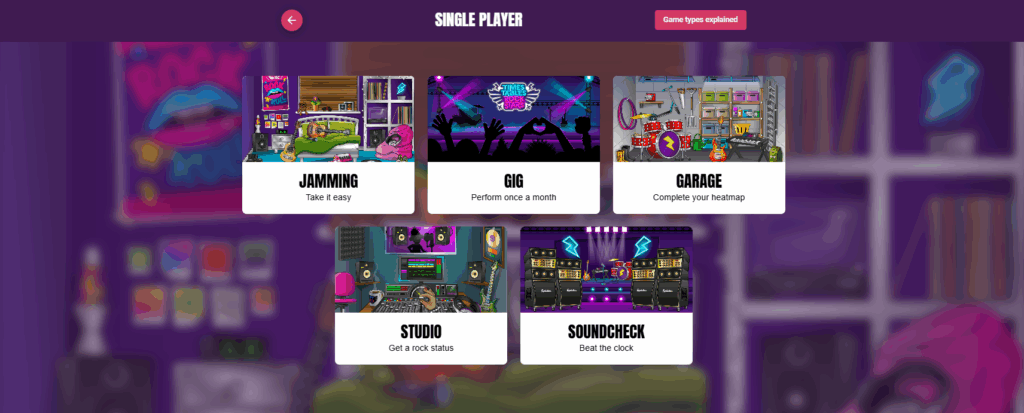
When young learners log in to TT Rock Stars for the first time, it can be exciting, but also a little daunting. With eight different game modes to choose from, it’s important to guide them so they don’t jump straight into something too challenging, especially if they’re just beginning to learn their times tables.

A common concern from teachers is:
“What level do my students start at when they first log in? I don’t want them getting overwhelmed.”
The short answer: They don’t start on a set level – they have access to all game modes. That’s why a little direction goes a long way, and here’s our direction for you:
STEP 1: Start with a Gig
Encourage your students to begin with the Gig. This one-time game checks their current level across all tables. It helps the algorithm understand where each learner is, and from that point on, it can begin to personalise their journey.

STEP 2: Move to garage
After completing the Gig, guide your students to Garage mode. This is a great daily practice space. It focuses on a small selection of tables tailored to each learner based on their progress (shown in their heatmap). It’s a confidence builder because it avoids starting with all 12 tables.

STEP 3: Jamming for extra practice
If a student needs a slower pace or extra support, try Jamming. It’s timer-free, reducing pressure. Students can choose which tables to practise, and they can toggle between multiplication and division. Note: Jamming doesn’t feed into the heatmap or affect progress stats – it’s purely for practice.
We’re always here to help. If you have any questions or need support, just drop us an email at support@mathscircle.com – we’ll be happy to assist!